
Being able to open a PDF only confirms that its pages can be displayed; it does not tell you whether an embedded digital signature has been checked. Use a reader with signature-validation features, inspect the certificate, and read the result for the specific version that was signed.
First identify your file: PDF or PDF.P7M?
A PDF can contain an embedded certificate-based signature, including a PAdES signature. Use a reader that can validate it. A .pdf.p7m file usually wraps the PDF inside a separate CAdES envelope. p7m online inspects that outer envelope; it does not validate signatures embedded inside PDFs. If you received a P7M, you can open it without uploading the document.
Open a P7M file online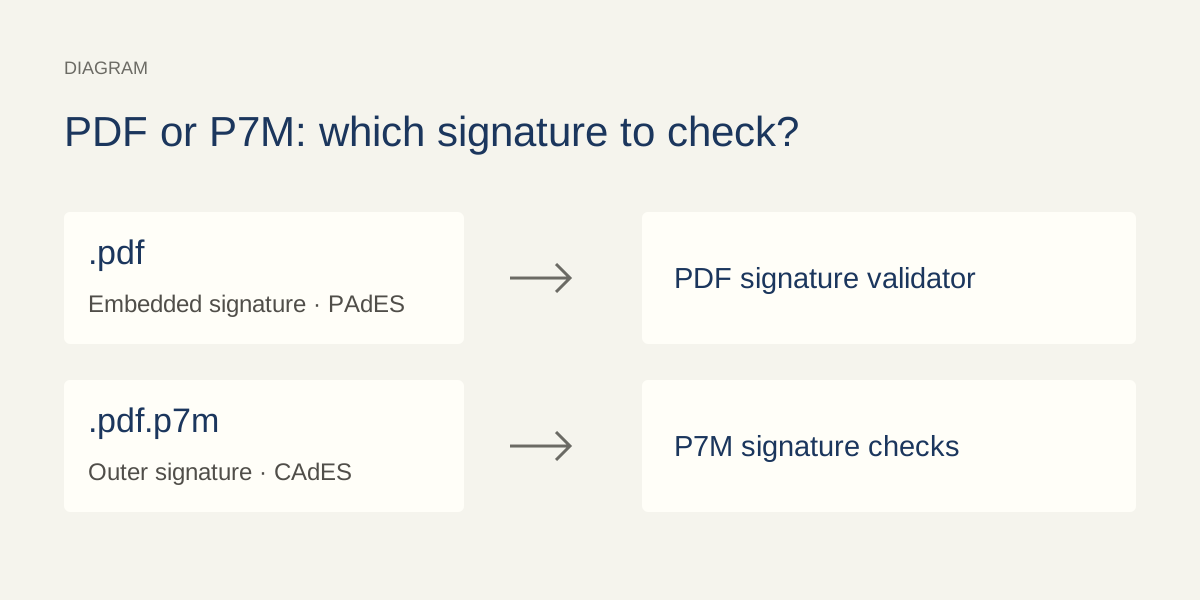
A signature image is not a signature check
A typed name, scanned handwritten signature or visible stamp is just part of the page’s visual appearance. That alone does not demonstrate a certificate-based digital signature. Conversely, a cryptographic signature can be present without any visible signature image. Check the reader’s signature panel rather than looking for a mark.
PAdES describes standardized profiles for signatures within PDF files. The .pdf extension alone proves neither that a signature exists nor that it meets a particular profile. The full filename helps you choose how to check the file, though the application still has to identify the actual format.
To learn how signed envelopes work, see what a P7M file is.
Adobe · Signature typesAdobe · Digital signaturesETSI · PAdES (EN 319 142-1)
How to check a PDF signature in Adobe Acrobat
Start with the original PDF received from the sender. Keep a separate copy before making edits. A screenshot, scan or PDF produced by printing is a new document and cannot substitute for the received signed file. These steps describe Adobe’s desktop interface; menu positions and wording can vary by application version and language.
Open the PDF in desktop Acrobat.
Use a version with digital-signature validation. A browser tab that only displays the pages is a different interface.
Open the Signatures panel.
Use its Options menu to run Validate Signatures. Menu positions and wording can vary by application version and language.
Read the detailed result for each signature.
Check what content or revision it covers and whether the reader reports later changes. Do not stop at a colored icon.
Inspect the certificate.
Open Signature Properties, then Show Signer’s certificate. Review the subject, issuer and validity period, together with the reader’s trust result. Compare the identity with the sender you expected.
Check time and later revisions.
Read the timestamp status separately. If there are later changes, use the reader’s signed-version comparison and inspect each signature in the sequence.
Four questions behind the validation result
- Is the signed content intact?
- Cryptographic verification checks the signature against the bytes it covers. An intact signed revision does not mean the current document has no later revisions. Digest calculations can run locally; they do not inherently require uploading the file or contacting a server.
- Whose certificate is it, and why is it trusted?
- Read the certificate subject and issuer, then inspect the chain to a trust anchor accepted by the validator. Displaying a name or embedding a certificate does not establish that trust. Confirm unexpected identity or issuer details with the sender or your organization’s administrator.
- Which time is being evaluated?
- Certificate start and expiry dates need to be interpreted alongside the validation time and available evidence. A date printed on a page or supplied by the signer’s computer is different from a successfully validated trusted timestamp.
- Is revocation evidence available?
- A certificate can be revoked before it expires. A validator may use signed revocation data already stored with the document or retrieve appropriate evidence under its configuration. Missing or unverifiable evidence leaves that question unresolved.
What does “signature not verified” mean?
The exact message matters more than its color. Distinguish between these situations and read the reason reported by the application.
On smaller screens, scroll the table horizontally.
| What the reader reports | What to examine next |
|---|---|
| Validation passed | Check which signatures, revisions and policy are covered. The result reflects the evidence and settings used by that validator. |
| Validation has not run | Run the signature check in a capable reader and open its detailed report. |
| Identity or trust is unknown | Examine the issuing chain and trust policy. Confirm certificate information independently. |
| Revocation status is unavailable | Check the stated reason and available evidence. Missing information does not prove that the certificate is unrevoked. |
| Certificate is expired | Inspect the validation time, timestamp and historical evidence. Current expiry alone does not settle every historical signature. |
| Content has changed | Review the signed revision and later changes. Some certifications permit form filling, annotations or further signatures; other changes may violate the restrictions. |
| Integrity check failed | Obtain the sender’s original file and compare the result using the same validation policy. Do not remove the warning by editing the signature. |
Do not mark an unfamiliar certificate as trusted or disable revocation checking just to clear a warning badge. Trust settings change what the program accepts; they do not repair the signed bytes. An unknown or indeterminate result is unresolved: it is not a valid result and is not automatically evidence of forgery.
European Commission · Validation resultsAdobe · Certificate informationAdobe · Certificate trust
Timestamps and signatures that need checking later
A timestamp provides time evidence only when its own signature and trust can be validated. Seeing a timestamp date is not enough. Certificate chains, revocation evidence and timestamps can support later validation, but a long-term validation label does not promise the same result under every future policy.
Retain the original received PDF and any associated validation report. If your workflow adds validation information, preserve the received version separately. Renaming, printing or extracting a document does not transfer evidence from one signature format to another.
Adobe · TimestampsAdobe · Verification informationEuropean Commission · DSS
Received a .pdf.p7m instead?
For a PDF wrapped in CAdES, first inspect the outer envelope. p7m online reports signed-content integrity, certificate dates, a locally available trust chain and supported local revocation evidence separately. Document processing stays in your browser. The tool does not make online OCSP or CRL requests; missing evidence leaves that check unverified.
The extracted PDF does not carry the outer CAdES signature. Keep the P7M original. If the PDF already has its own embedded signature, that is a separate signature to check in a PDF-capable validator. p7m online does not perform that inner PAdES check.
Opening the P7M, its local technical checks and the first-page PDF preview are free. Full previews, downloading and printing require a paid plan.
For the outer signature, inspect a P7M signature in your browser.
To read the enclosed document, see our guide on extracting the original PDF from P7M.
For paid features, compare plans and download options.
PDF signature verification FAQ
Can I check a PDF signature in Chrome, on Mac or on my phone?
It depends on the application and version. A preview may display the pages without evaluating certificates, revocation or signed revisions. If your reader does not show those results, use a signature-capable validator and keep the original file. The Acrobat steps above describe its desktop interface.
No signature appears in the panel. Is the PDF unsigned?
First confirm that the application supports embedded-signature inspection and that you opened the original file. A handwritten signature image is not a certificate-based signature, while a print-to-PDF copy may no longer contain the original signature data.
Can this website validate a signed PDF online?
p7m online does not validate embedded PDF/PAdES signatures. Its tool inspects CAdES envelopes with a .p7m extension. For a standalone signed PDF, follow the PDF-reader instructions in this guide.
Can I use an online PDF validator?
Check which signature formats and evidence it evaluates, what its report means, and whether it sends the document to a server. Choose according to the document’s confidentiality requirements and your organization’s workflow. An online preview alone is not a signature-validation report.
Official sources and further reading
Technical guide based on official documentation reviewed on 11 November 2026. Application menus and results can vary with the version, trust policy and available evidence.
- Adobe · Signature types
- Adobe · Digital signatures
- ETSI · PAdES (EN 319 142-1)
- Adobe · Validate signatures
- Adobe · Compare signed versions
- European Commission · DSS
- Adobe · Validation preferences
- European Commission · Validation results
- Adobe · Certificate information
- Adobe · Certificate trust
- Adobe · Timestamps
- Adobe · Verification information
- AgID · CAdES / PAdES